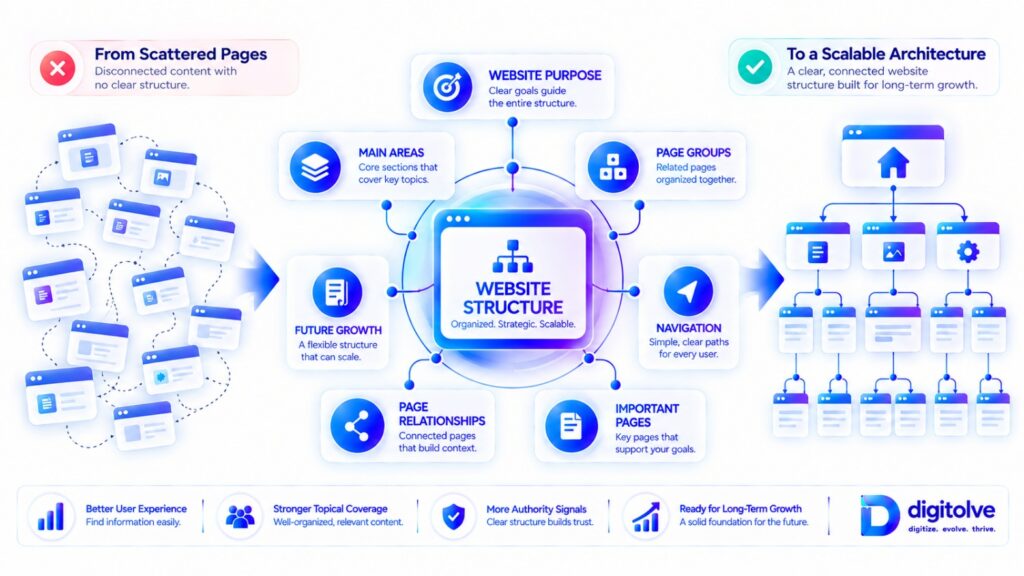
Introduction — Why Website Structure Matters as Your Website Grows
A website can start with only a few pages and still feel easy to manage. But as more content, categories, landing pages, products, and supporting resources are added, the website gradually becomes more complex.
More pages create more relationships. More relationships create more organizational decisions. And without a clear structure, those decisions can become increasingly difficult to manage.
This is why website growth is not simply about adding more pages. It is also about deciding where those pages belong, how they relate to one another, how visitors move between important areas, and how the structure can continue to make sense as the website expands.
A collection of useful pages does not automatically become a well-organized website.
A strong website structure gives those pages a logical place within the larger system. Main areas can be separated clearly, related pages can be grouped appropriately, important sections can remain easier to reach, and new content can be added without constantly creating a new structural problem.
This becomes especially important for websites that are growing over time. A structure that works for twenty pages may become difficult to maintain when the website contains hundreds of pages.
The goal, therefore, is not simply to create a structure for the website you have today. It is to build an organization that can continue to support the website you intend to build tomorrow.
The core shift is:
More Pages → More Relationships → More Complexity → Greater Need for Structure
In this guide, we will move through the practical process of understanding your current structure, organizing pages, building a clear hierarchy, creating meaningful relationships, improving navigation, simplifying unnecessary complexity, and preparing the structure for future growth.
Table of Contents
What an SEO-Friendly Website Structure Actually Means
An SEO-friendly website structure is not simply a website with a menu at the top and a collection of pages underneath it.
It is the way the website’s pages, sections, categories, navigation, and relationships are organized so that the overall system remains understandable and usable as the website grows.
Website Structure Is More Than Navigation
Navigation is one visible part of website structure, but the structure itself is broader.
It includes how pages are grouped, how different sections relate to one another, where important pages sit within the hierarchy, and how visitors can move from one relevant area to another.
A well-designed navigation menu cannot completely compensate for a website whose underlying organization is confusing.
How Pages Fit Into a Larger Hierarchy
Most websites contain different levels of information.
A main section may contain categories, those categories may contain supporting pages, and those pages may lead visitors toward more specific resources.
This creates a hierarchy that gives individual pages context.
Instead of seeing every page as an isolated asset, the website becomes a connected system in which each page has a logical place.
Main Sections, Categories, and Supporting Pages
A clear structure makes it easier to distinguish between major website areas and the pages that support them.
Main sections establish broad organization. Categories group related material. Supporting pages provide more specific information within those areas.
The exact structure will vary by website, but the principle remains consistent: related pages should have a logical relationship within the larger organization of the site.
Structure vs Individual Page Optimization
Optimizing an individual page and organizing an entire website are different tasks.
A page can have useful content and strong on-page elements while still being difficult to reach or poorly connected within the wider website.
Website structure looks beyond the individual page and asks how the pages work together.
What Makes a Structure Clear and Scalable?
A clear structure should be understandable without requiring visitors to guess where information belongs.
A scalable structure should also provide reasonable rules for adding new pages without constantly creating new categories, duplicate sections, or confusing pathways.
The goal is not to make the structure unnecessarily complicated. It is to create enough organization that the website remains clear as it expands.
Why Website Structure Should Reflect Purpose
Your website structure should ultimately reflect what the website is trying to help people find and understand.
Important areas should have meaningful places within the structure, while unrelated material should not be grouped together simply because it was published around the same time.
Google also explains that logical site structure and relevant internal links can help its systems understand the relationships between pages and find important content. Its guidance on site structure and sitelinks specifically recommends creating a logical structure that is easy for users to navigate and linking to important pages from relevant pages.
This does not mean that a particular structure guarantees rankings or search traffic. It means that structure is an important part of making a website understandable, navigable, and discoverable.
Core principle: A good website structure helps people and search systems understand how the website’s important pages relate to one another.
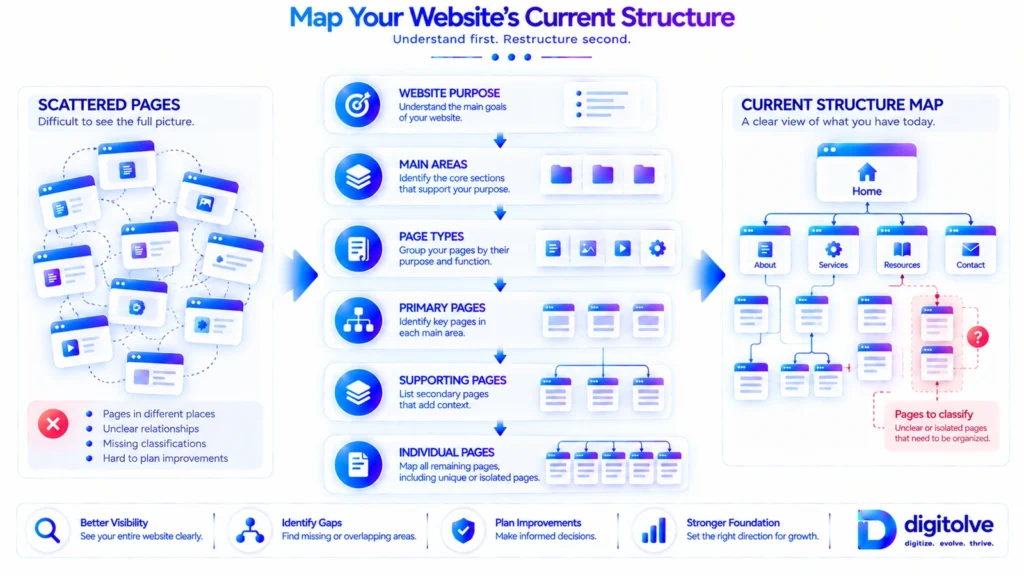
Start by Mapping Your Website’s Current Structure
Before changing your website structure, you need to understand what already exists.
This step is easy to skip. Website owners often begin by creating new categories, changing navigation, or moving pages without first mapping the current structure.
That can create new problems while trying to solve old ones.
Identify the Website’s Major Areas
Begin by looking at the website as a whole.
Identify its major areas and ask what role each area plays within the website.
For example, a website may contain core service areas, educational content, product sections, resources, supporting information, or other major groups.
The purpose at this stage is not to redesign anything. It is simply to understand the current landscape.
List the Main Page Types
Next, identify the different types of pages currently present.
These might include main section pages, category pages, individual content pages, product pages, resource pages, or other supporting page types.
Understanding page types helps reveal whether similar pages are being handled consistently or whether the website has developed different organizational patterns over time.
Identify Primary and Supporting Pages
Not every page has the same role.
Some pages represent major areas of the website, while others exist to provide supporting information around those areas.
Making this distinction visible can help you understand whether supporting pages are actually connected to the areas they are supposed to support.
Group Existing Pages by Purpose
Now begin grouping pages according to what they are actually intended to accomplish.
Look for pages that naturally belong together and pages that appear to have been grouped together simply because of how they were published or added to the website.
This is where structural patterns often become visible.
Find Pages That Do Not Clearly Belong Anywhere
Some pages may not fit comfortably into any existing section.
That does not automatically mean the page should be deleted or that a new category should be created.
Instead, treat these pages as structural signals. They may indicate an unclear relationship, an incomplete category, an unnecessary page, or a need to reconsider where that information belongs.
Understand the Current Structure Before Changing It
The objective of mapping is to create a clear starting point.
Before rebuilding anything, you should be able to describe the current structure in a simple sequence:
Website Purpose → Main Areas → Page Groups → Individual Pages
Once this map exists, structural decisions become much easier because you are improving a known system rather than changing pages at random.
And importantly, mapping the current structure does not mean copying every existing decision into the new structure. It simply gives you the information needed to decide what should stay, what should move, what should connect, and what may need simplification.
Build a Clear Website Hierarchy
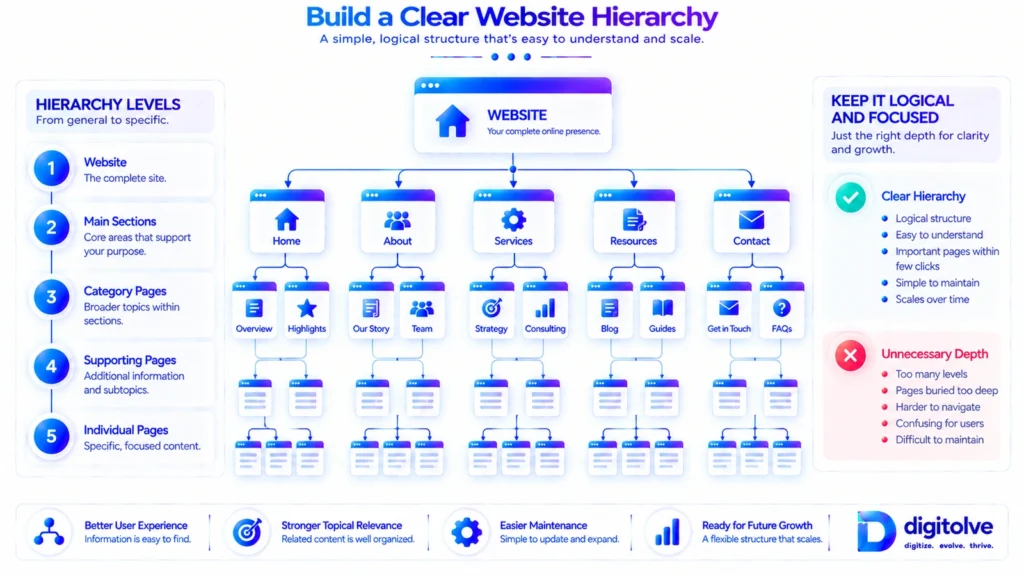
Once you understand the current structure, the next step is to organize the website into a hierarchy that makes relationships easier to understand.
A hierarchy gives pages context. It helps distinguish major areas from supporting information and creates a logical path through the website.
Understand Parent and Child Relationships
A parent page represents a broader area, while child pages sit within or support that broader area.
This relationship should make sense from a visitor’s perspective.
If two pages belong to completely different areas, placing them under the same structural parent can create confusion. If several pages clearly belong to one broader section, separating them without a reason can make the structure harder to understand.
Organize Pages Into Logical Levels
A good hierarchy does not require every page to sit at the same level.
Instead, pages should be organized according to their role and relationship within the website.
The structure might move from broad areas to more specific sections and then to individual pages.
Main Area → Section → Supporting Area → Specific Page
The exact number of levels depends on the website, but each level should have a clear reason to exist.
Keep Important Pages Close to the Main Structure
Important pages should not become buried beneath unnecessary layers of organization.
If a page is central to the website’s purpose, its structural position and pathways should make that importance understandable.
This is not about forcing every important page into the homepage or creating excessive navigation links. It is about avoiding a structure where valuable pages become difficult to reach simply because of how the hierarchy was built.
Avoid Unnecessary Structural Depth
Adding more levels does not automatically create better organization.
Too many layers can make the website harder to understand and can make it more difficult for visitors to reach the information they need.
Each additional level should therefore solve a real organizational problem rather than simply making the structure look more detailed.
Make the Hierarchy Easy to Understand
A useful test is to look at the structure without reading the individual page content.
Could you understand what the major sections are? Could you tell which pages belong to which areas? Could you identify the relationship between a main section and its supporting pages?
If the answer is no, the hierarchy probably needs simplification.
Keep Similar Page Types Consistent
Similar pages should generally follow similar organizational rules.
If one type of page is placed under a particular section while another nearly identical page is placed somewhere completely different, the structure becomes harder to understand and maintain.
Consistency creates predictable rules for both existing pages and future additions.
The goal is simple: if someone saw only the website structure, they should be able to understand how the website is organized.
Create Logical Categories and Content Groups
Once the hierarchy is clear, the next step is deciding how related pages should be grouped within that structure.
Categories can make a growing website easier to understand, but only when they have a clear purpose. Creating a category for every new subject can quickly produce the same complexity that the structure was supposed to prevent.
Group Related Pages Together
Pages that serve closely related purposes should generally have a logical place within the same broader area.
This does not mean that every related page must sit inside one category. The goal is to create meaningful groups that make the website easier to navigate and maintain.
Give Each Category a Clear Purpose
Every category should answer a simple question: Why does this group exist?
If the purpose of a category is difficult to explain, it may not be providing useful structure.
A clear category should help visitors understand what type of information they will find there and how that information relates to the wider website.
Avoid Categories That Overlap
Overlapping categories can create uncertainty about where new pages belong.
If two categories appear to cover almost the same subject, the structure may eventually become inconsistent as more content is added.
Before creating another category, consider whether the existing structure can accommodate the new page logically.
Avoid Creating Too Many Small Categories
A category containing only one or two pages is not automatically wrong, but repeatedly creating small categories can make the website feel fragmented.
Categories should solve an organizational need rather than exist simply because a new topic has appeared.
Keep Similar Content Types Consistently Organized
Similar page types should follow predictable organizational rules.
When similar content is scattered across unrelated sections, visitors may struggle to understand where information belongs and future content planning becomes harder.
Consistency makes the structure easier to maintain as the website grows.
Know When a Page Should Not Become a New Category
Not every new subject requires a new category.
Sometimes an existing section already provides an appropriate home for the page. Creating another category in that situation can add unnecessary complexity without improving the visitor’s understanding of the website.
The goal is not to create more categories. It is to create useful organizational groups that make the website clearer and easier to scale.
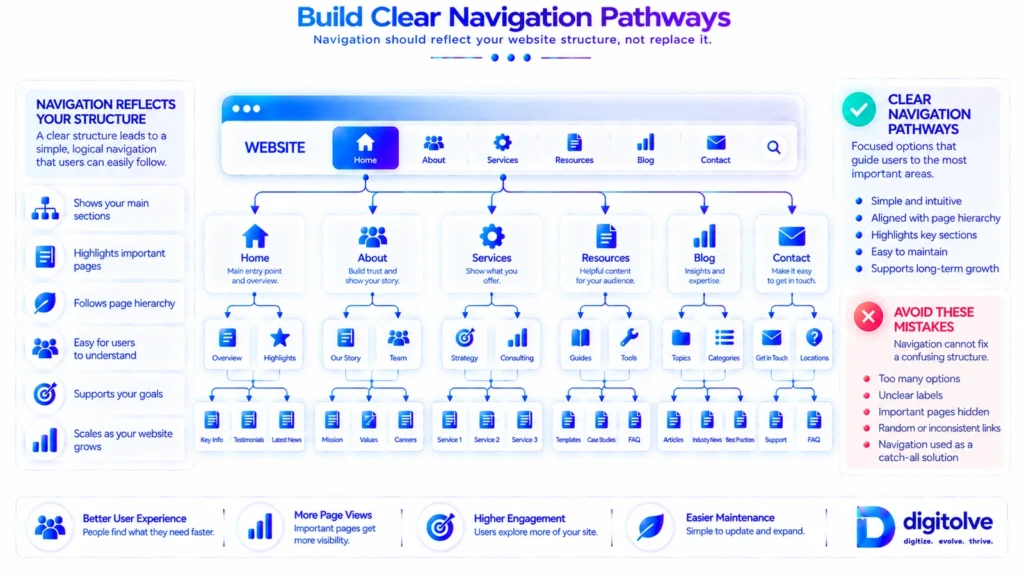
Build Clear Navigation Pathways
Once pages and categories have been organized, visitors need clear ways to move through them.
Navigation is where the underlying structure becomes visible to the person using the website. It should help visitors understand where they are, where they can go next, and which areas of the website matter.
Help Visitors Understand Where They Are
A visitor should not have to guess which part of the website they are currently exploring.
Clear section names, logical page relationships, and consistent navigation patterns can make the website easier to understand.
Good navigation supports the hierarchy rather than hiding it.
Connect Main Navigation With Website Priorities
The main navigation should reflect the areas that are genuinely important to the website.
This does not mean placing every page in the main menu. It means giving the most important areas appropriate visibility within the overall navigation system.
Create Logical Paths to Important Areas
Important sections should have clear pathways leading to them.
A visitor should not need to move through several unrelated pages simply to reach an area that is central to the website’s purpose.
Clear pathways can exist through primary navigation, relevant section pages, contextual page relationships, and other appropriate structural connections.
Keep Navigation Focused
Adding more navigation options does not necessarily make a website easier to use.
Too many choices can make the navigation difficult to scan and can weaken the distinction between primary and secondary areas.
A focused navigation system gives visitors a clearer understanding of the website’s main structure.
Avoid Navigation Overload
If every page, category, product, resource, and subtopic is placed directly into navigation, the menu can become difficult to manage.
Instead, use the hierarchy to organize information and allow navigation to expose the most useful pathways at the appropriate level.
Make Important Sections Easy to Reach
Navigation should make the website’s important areas accessible without creating unnecessary complexity.
This is especially important as the website grows. A navigation system that works for a small website may become overloaded when dozens of new sections are added.
The underlying principle is:
Navigation should reflect the website’s structure — not compensate for a confusing structure.
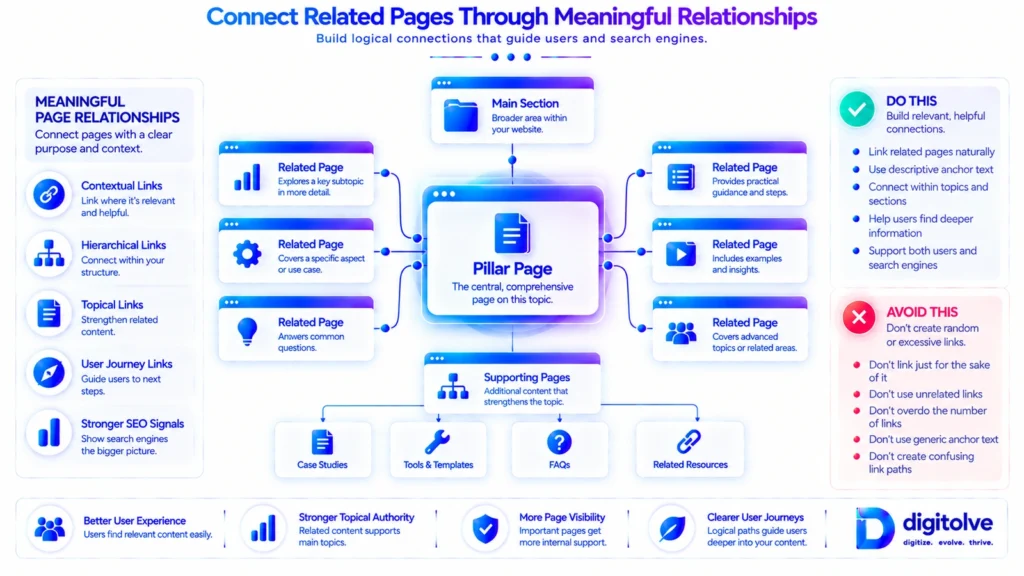
Connect Related Pages Through Meaningful Relationships
A clear hierarchy tells you where pages belong. Meaningful page relationships help those pages work together.
This is an important part of website structure because individual pages should not become isolated assets within an otherwise organized website.
Why Pages Should Not Exist in Isolation
A useful website is made up of relationships as well as individual pages.
A supporting page may naturally relate to a broader section. A detailed resource may support an important page. Several related pages may help visitors explore different aspects of the same area.
These relationships give the structure greater meaning.
Connect Supporting Pages With Important Pages
Supporting content should have logical pathways toward the pages and sections it supports.
This does not mean every supporting page should link directly to the same destination. The relationship should make sense in context.
The objective is to make the connection between related areas understandable.
Create Meaningful Page-to-Page Relationships
When two pages genuinely help a visitor move from one piece of information to another, connecting them can strengthen the overall structure.
The relationship should be based on usefulness and context rather than an attempt to create as many connections as possible.
Connect Related Sections Where Appropriate
Relationships can also exist between broader website sections.
For example, one section may naturally support another because visitors often need information from both areas to understand a larger subject or complete a task.
These connections should remain intentional and understandable.
Avoid Random or Forced Connections
More connections do not automatically create better structure.
Random links can make relationships harder to understand and may distract visitors from the pathway they actually need.
Every structural connection should have a reason.
Review Missing Structural Relationships
After organizing the website, look for important pages that appear isolated.
Ask:
- Does this page have a clear place within the website?
- Is its relationship with related pages understandable?
- Can visitors reach the next relevant area naturally?
- Are important sections connected where a genuine relationship exists?
This is not a complete internal-linking exercise. The focus is broader: how page relationships contribute to the overall structure of the website.
Make Important Pages Easier to Discover
A well-organized website should not only have a clear hierarchy. It should also make its important pages reasonably easy to discover.
As websites grow, valuable pages can gradually become buried beneath newer content, additional categories, or unnecessary structural layers. This can make the website harder to navigate and can weaken the relationship between important pages and the rest of the site.
Identify Pages That Matter Most
Start by identifying the pages that play an important role in the website.
These may include core service pages, important product pages, major content hubs, key resources, or other pages that support the website’s primary purpose.
Not every page needs the same level of structural prominence. The goal is to understand which pages deserve stronger pathways.
Give Important Pages Clear Structural Pathways
Once important pages are identified, review how visitors can reach them.
They should have logical pathways from relevant sections rather than depending entirely on visitors finding them through search or navigating through unrelated pages.
A clear pathway helps connect an important page with the parts of the website that naturally support it.
Reduce Unnecessary Distance From Important Areas
Structural distance is not simply about counting clicks. It is also about understanding how many unnecessary layers or unrelated decisions stand between a visitor and an important area.
If a valuable page is hidden inside a complicated structure without a clear reason, the structure may need to be simplified.
Review Pages That Are Difficult to Reach
Look for pages that are technically present but practically difficult to discover.
Ask whether their location makes sense, whether they belong within the correct section, and whether relevant pages provide appropriate pathways toward them.
A page should not become difficult to find simply because it was published long ago or because newer content gradually pushed it deeper into the website.
Don’t Let Publication Order Determine Website Importance
Websites often grow chronologically: a page is published, another page is added, and another follows.
Over time, this can create a structure based on when pages were published rather than how important or related those pages are.
Publication order can be useful for archives or time-based content, but it should not automatically determine the structural importance of every page.
Align Structure With Page Importance
The stronger approach is to let the website’s purpose and page relationships guide structural decisions.
Important pages should have appropriate places within the hierarchy, clear relationships with relevant sections, and reasonable pathways for discovery.
This does not guarantee search rankings or traffic. It simply creates a clearer website structure in which important content is less likely to become structurally overlooked.
Important pages should have an intentional place in the structure — not merely exist somewhere inside it.
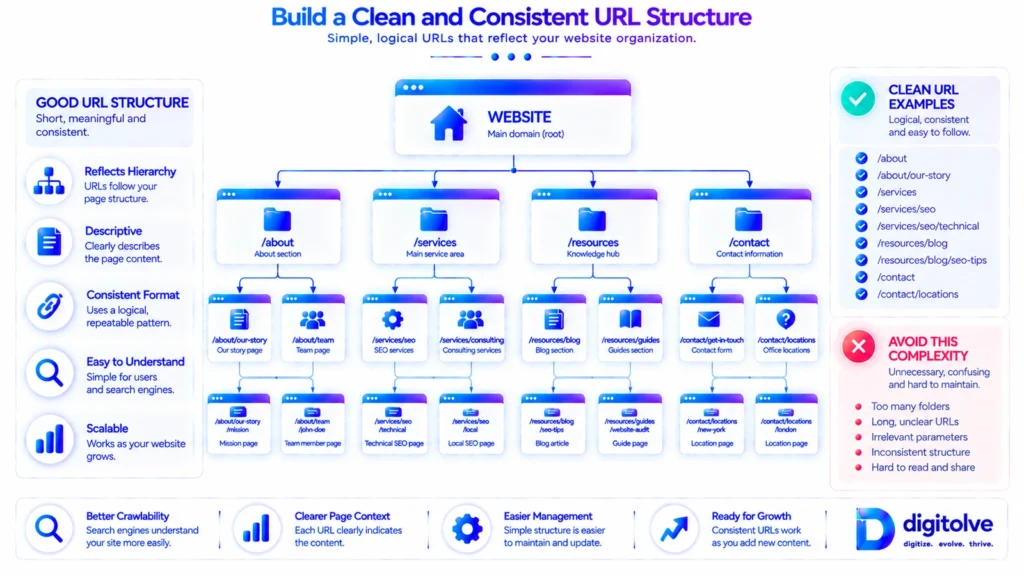
Build a Clean and Consistent URL Structure
Website structure is also reflected in the way URLs are organized.
A clean URL structure can make the relationship between different sections and pages easier to understand, while inconsistent or unnecessarily complicated URL patterns can make future organization more difficult.
Keep URLs Simple and Meaningful
A useful URL should communicate enough information to make its purpose reasonably clear without becoming unnecessarily long or complicated.
Simple, meaningful URLs are easier to understand and maintain as the website grows.
Reflect Logical Organization Where Appropriate
Where it makes sense for the website, URL patterns can reflect the broader organization of its sections and page types.
This can create consistency between the visible website structure and the underlying URL patterns.
However, the goal should be logical organization rather than forcing every URL into a complicated folder structure.
Avoid Unnecessary URL Complexity
Long chains of unnecessary folders, confusing parameters, or inconsistent naming patterns can make URLs harder to manage.
Before creating a new URL pattern, consider whether it actually improves organization or simply adds another layer of complexity.
Keep Similar Page Types Consistent
If similar pages follow completely different URL patterns, the website becomes harder to maintain.
Consistent naming and organizational rules make it easier to understand where future pages should belong.
Think About Future Growth Before Creating New URL Patterns
A URL structure may appear perfectly reasonable when a website is small but become difficult to maintain as more pages are added.
Consider whether the pattern can accommodate future sections and pages without requiring a new organizational approach every time the website expands.
Avoid Changing URLs Without Understanding the Wider Impact
URL changes should not be treated as simple renaming exercises.
A URL may already be connected to navigation, internal relationships, external references, search results, analytics, or other parts of the website.
Before changing an established URL, understand what depends on it and plan the wider structural change carefully.
The objective is not to create a technically complicated URL system. It is to maintain simple, meaningful, consistent, and scalable URL organization that fits the wider website structure.
Design the Structure for Future Growth
A website structure should solve more than today’s organizational problems.
If the website is expected to keep growing, its structure needs enough flexibility to accommodate new content without becoming increasingly fragmented.
Plan for Future Content
Before adding a new page, consider where similar pages will belong if more of them are created later.
This simple question can prevent one-off structural decisions from becoming permanent problems.
Leave Room for New Sections
A scalable structure should have logical areas where new content can be added when the website expands.
This does not mean creating empty categories in advance. It means establishing clear organizational principles that can guide future additions.
Create Rules for Where New Pages Belong
One of the most useful outcomes of a good structure is predictability.
When a new page is created, the team should be able to determine where it belongs based on the website’s existing organizational rules.
This reduces the need to make a completely new structural decision for every new piece of content.
Prevent Structural Duplication
As websites grow, similar sections can appear in different parts of the site without anyone intentionally planning them.
Regularly reviewing the structure can help identify duplicate categories, overlapping sections, and competing organizational patterns.
Avoid Creating a New Category for Every New Topic
Growth does not require a new category every time a new subject appears.
First determine whether the new page naturally belongs within an existing section. If it does, expanding the existing structure may be more useful than creating another branch.
Keep the Structure Consistent as the Website Expands
The real test of a website structure is not whether it looks organized today. It is whether the same organizational logic continues to work as new pages, sections, and relationships are added.
The objective is to move from:
Current Website Structure → Future Website Structure
In other words, the structure should not merely organize what already exists. It should provide a practical framework for organizing what comes next.
Common Website Structure Problems
Website structure problems are not always obvious when a website is small. As more pages and sections are added, however, weak organizational decisions can become increasingly difficult to ignore.
Understanding these common problems can help you recognize where the current structure may need simplification or improvement.
Flat Website Structure
A flat structure treats too many pages as though they have the same level of importance.
When there is little distinction between major sections, supporting areas, and individual pages, visitors can have difficulty understanding how the website is organized.
A clearer hierarchy gives related pages context and creates more predictable pathways.
Too Many Categories
Creating a new category whenever a new subject appears can gradually fragment the website.
Instead of making the structure clearer, an excessive number of categories can make it harder to determine where information belongs and which areas are actually important.
Deep and Confusing Page Paths
A website can become unnecessarily deep when pages are placed beneath multiple layers without a clear organizational reason.
Depth should serve a purpose. If additional levels do not make the relationship between pages clearer, they may simply be adding complexity.
Important Pages Hidden Inside the Structure
Some websites contain important pages that are technically available but difficult to reach.
This can happen when new content continues to accumulate around them without maintaining clear structural pathways.
Important pages should have an intentional place within the hierarchy and meaningful routes from relevant areas.
Duplicate or Overlapping Sections
Two sections can gradually develop similar purposes, especially when a website grows over a long period without regular structural review.
Overlapping sections make future organization harder because new pages may appear to belong in more than one place.
Random Page Organization
When pages are organized according to publication order, individual decisions, or temporary priorities rather than a consistent system, the structure can become difficult to understand.
A scalable website needs rules that remain useful beyond the moment when each page was created.
Navigation That Does Not Reflect Website Priorities
A website may have a technically functional navigation menu while still failing to communicate its actual priorities.
If secondary pages receive the same prominence as core areas, or important sections are difficult to reach, navigation can become disconnected from the underlying structure.
Important Pages With Weak Structural Connections
A page may belong to the correct category but still have weak relationships with the other pages that should support or lead toward it.
This creates a structure that looks organized at the category level but remains disconnected at the page level.
Structure That Was Never Designed to Scale
Perhaps the most common long-term problem is a structure that worked when the website was small but was never designed to accommodate continued growth.
As new pages are added, more exceptions are created, more categories appear, and more navigation decisions become necessary.
Structural problems often become more visible as the website grows because growth increases the number of relationships the structure has to manage.
Small structural inconsistencies can become significant organizational problems when they are repeated across a growing website.
Build Your Website Structure Step by Step
Once you understand the current structure, hierarchy, categories, navigation, relationships, and future requirements, these decisions can be brought together into a repeatable process.
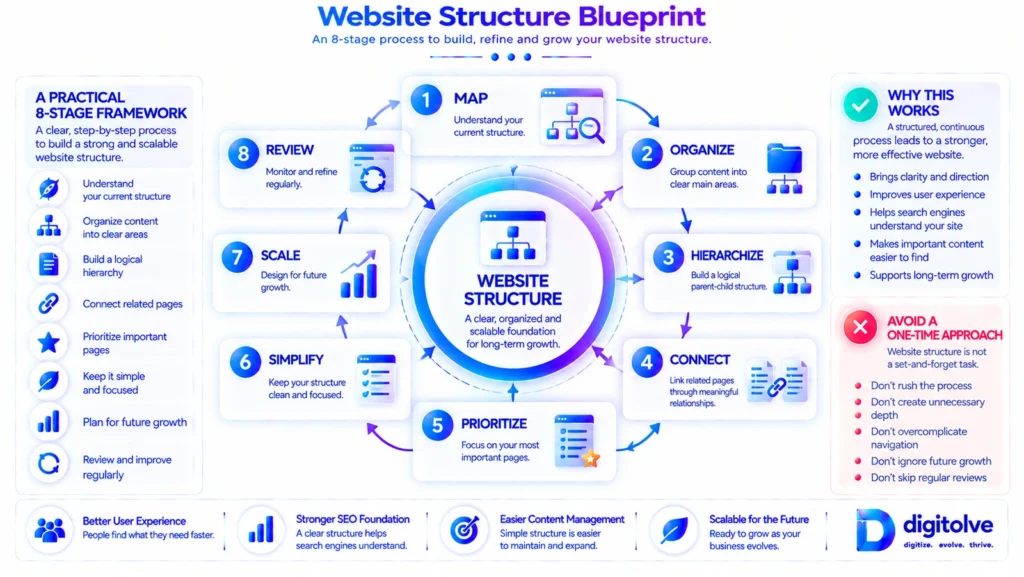
The framework is:
MAP → ORGANIZE → HIERARCHIZE → CONNECT → PRIORITIZE → SIMPLIFY → SCALE → REVIEW
1. MAP
Understand the current website.
Identify its major areas, page types, important pages, supporting pages, categories, and existing relationships before making structural changes.
2. ORGANIZE
Group pages according to clear purposes.
Identify which pages naturally belong together and establish meaningful organizational groups without creating unnecessary categories.
3. HIERARCHIZE
Create logical parent and child relationships.
Decide which areas are broader and which pages belong beneath them, while avoiding unnecessary structural depth.
4. CONNECT
Create meaningful relationships between related pages and sections.
The objective is to ensure that pages do not become isolated from the areas they naturally support.
5. PRIORITIZE
Identify which sections and pages matter most to the website’s purpose.
Make sure important areas have appropriate structural pathways rather than becoming buried beneath less important content.
6. SIMPLIFY
Remove unnecessary structural complexity.
Review duplicate categories, overlapping sections, excessive depth, confusing pathways, and organizational decisions that no longer serve a useful purpose.
7. SCALE
Prepare the structure for future growth.
Establish practical rules for where new pages and sections should belong so that every future addition does not require reinventing the website’s organization.
8. REVIEW
Review the structure regularly as the website changes.
New content, new sections, and changing priorities can gradually create new structural problems, so the website should not be treated as permanently finished after its initial organization.
This framework provides the strategic sequence for building and improving a website structure:
Map the current system → Organize it → Create hierarchy → Connect relationships → Prioritize important areas → Simplify complexity → Prepare for growth → Review continuously.
The detailed implementation process, worksheets, mapping tools, prioritization tools, and quality checks belong inside the Website Structure Blueprint rather than this article.
Why Website Structure Becomes More Important as Your Website Grows
Website structure becomes increasingly important because growth increases the number of relationships the website has to manage.
A small website may have only a few major sections and a limited number of pages. As content expands, the number of possible relationships between pages, categories, navigation paths, and important areas also increases.
More Content Creates More Relationships
Every new page has to belong somewhere and relate appropriately to the pages around it.
The more content a website contains, the more important it becomes to have clear rules for those relationships.
More Pages Increase Organizational Complexity
Adding pages is easy compared with deciding how those pages should fit into an existing structure.
Without consistent organizational principles, every new page can introduce another exception.
New Categories Can Create Duplication
As websites grow, new categories may be created to solve immediate organizational problems.
Over time, however, several categories can begin serving similar purposes, making the structure harder to maintain.
New Content Can Create Structural Inconsistencies
If different people or teams add content using different organizational decisions, similar pages can end up in different places.
This makes the website less predictable and can create unnecessary complexity.
Important Pages Can Become Harder to Reach
New content can gradually push older or less frequently updated pages deeper into the structure.
Without periodic review, pages that remain important to the website can become structurally overlooked.
Navigation Can Become Overloaded
As more sections are added, there is often pressure to expose everything through navigation.
But adding more menu items does not solve an underlying organizational problem. A scalable hierarchy should carry much of the organizational load.
Growth Without Structure Creates Fragmentation
The pattern is straightforward:
Small Website → More Pages → More Relationships → More Complexity → Greater Need for Structure
This is why website structure should be treated as part of the website’s long-term foundation rather than as a one-time menu or category setup.
Turn Individual Pages Into a Connected Website
A strong website structure is more than a hierarchy of folders, categories, and menus. The real strength comes from how those structural layers work together.
Individual pages should have a clear place, a meaningful relationship with surrounding pages, and an understandable pathway through the wider website.
Pages Should Not Exist in Isolation
A page may answer a specific question or serve a specific purpose, but it should still make sense within the larger website.
When important pages exist without meaningful relationships to relevant sections, the website can become a collection of isolated assets rather than a connected system.
Sections Should Have Clear Relationships
Major website sections should have understandable relationships with one another.
Some sections may be independent, while others may naturally support or extend another area. The structure should make those relationships clear without forcing unrelated sections together.
Navigation Should Reflect Hierarchy
Navigation should reinforce the hierarchy established earlier in the structure.
When the navigation reflects the website’s major areas and priorities, visitors can use it as a practical representation of the underlying organization.
If navigation and hierarchy tell completely different stories, the website can become harder to understand.
Internal Relationships Should Support Structure
Meaningful relationships between pages can strengthen the structure by showing how related information fits together.
This does not mean adding links simply to increase the number of connections. The relationship should help visitors move naturally between pages that genuinely belong together.
Important Pages Should Have Clear Pathways
Important pages should not depend on a single route or remain disconnected from the areas that support them.
A well-organized structure gives those pages appropriate pathways through navigation, relevant sections, and meaningful relationships.
The Website Should Become Easier to Understand as It Grows
Growth should not make the website increasingly confusing.
When hierarchy, categories, navigation, page relationships, and priorities work together, additional pages can become part of an existing system rather than creating a completely new organizational problem.
The core principle is:
A strong website structure is not just a hierarchy. It is a network of meaningful relationships organized around a clear hierarchy.
Build a Repeatable Website Structure Improvement Cycle
Website structure should not be treated as something that is designed once and then forgotten.
Websites change. New pages are published, old pages are updated, new sections are introduced, products change, and the priorities of the business can evolve.
Each change can create new structural decisions.
Review
Start by reviewing the current structure.
Look for pages that have become isolated, categories that overlap, navigation that has become crowded, and sections that no longer reflect the website’s current purpose.
Map
Update your understanding of the website’s major areas, page groups, important pages, and relationships.
This creates a current picture of the system rather than relying on an old structure map.
Organize
Group pages according to their current purpose and relationships.
As the website changes, some pages may need to move into more appropriate sections or be reconsidered as part of a larger group.
Connect
Review the relationships between pages and sections.
Identify important pages that have become isolated and meaningful relationships that are no longer clearly represented.
Simplify
Remove unnecessary complexity where possible.
This may involve reducing overlapping categories, simplifying pathways, or reconsidering structural layers that no longer provide useful organization.
Prioritize
Make sure the structure continues to reflect which areas and pages matter most to the website’s purpose.
Structural prominence should not simply follow publication date or the order in which pages happened to be created.
Scale
Before adding new sections or pages, consider how they will fit into the existing structure and whether the same organizational rule will still work when the website grows further.
Review Again
The cycle then returns to review:
Review → Map → Organize → Connect → Simplify → Prioritize → Scale → Review ↺
This continuous approach helps prevent small structural decisions from accumulating into larger organizational problems.
The objective is not to redesign the entire website every time something changes. It is to maintain a structure that continues to make sense as the website evolves.
From Website Structure to Long-Term SEO Growth
Website structure is one part of a broader SEO system, but it provides an important organizational foundation for a growing website.
When the website has a clear purpose, logical hierarchy, organized categories, meaningful navigation, and useful page relationships, important content can become easier to understand and discover.
The progression looks like this:
Clear Website Purpose
↓
Logical Hierarchy
↓
Organized Categories
↓
Clear Navigation
↓
Meaningful Page Relationships
↓
Important Content Easier to Discover
↓
Scalable Structure
↓
Stronger Long-Term Foundation
Structure Creates Organization
A clear structure gives individual pages a meaningful place within the website rather than leaving them as disconnected assets.
Relationships Create Context
When related pages and sections are meaningfully connected, visitors can better understand how information fits together and where they can go next.
Scalability Protects Future Growth
A structure designed for growth gives new content a clear place to belong and reduces the need to create increasingly complicated exceptions.
Structure Supports Discovery — But Does Not Guarantee Rankings
An organized website structure can support navigation, understanding, and discovery, but it should not be treated as a guarantee of higher rankings or increased traffic.
SEO performance depends on many factors beyond website structure.
The practical goal is to build an environment where the website’s important pages are organized, connected, understandable, accessible, and capable of scaling with future growth.
Where to Go Next: Build Your Website Structure
Understanding what a strong website structure looks like is the first step. The next step depends on what you need from your current website.
If you are looking at your website and thinking, “I understand what good structure should look like, but I don’t know how to reorganize my own website,” the next step is to move from understanding into practical execution.
Need to Understand What Is Wrong?
If your deeper question is “What is actually wrong with my current website structure?”, start with the diagnostic side of the system:
Structure Optimization Toolkit
It is designed to help identify structural problems, gaps, and optimization opportunities before you begin rebuilding the website.
Need to Build or Rebuild the Structure?
If you already understand the problem and need a practical process for organizing your website, the Website Structure Blueprint takes the next step.
It moves from:
Mapping → Organization → Hierarchy → Connections → Prioritization → Simplification → Scalability → Implementation
The Blueprint is designed to help turn the principles in this article into a practical website structure rather than simply leaving you with a list of recommendations.
Need a Broader Architecture System?
For larger or more complex websites, the future Site Architecture System — Core can extend this foundation into a broader architecture system covering structure, information architecture, navigation, taxonomy, content relationships, and scalable site organization.
The progression is therefore simple:
Understand Structure → Diagnose Structure → Build/Rebuild Structure → Scale Site Architecture
The objective is not to change your website structure simply for the sake of change. It is to build an organization that makes sense today and continues to make sense as the website grows.
Conclusion — Build a Website Structure That Can Grow With You
A website should not simply become larger as more pages are published. It should become more organized, connected, understandable, and scalable.
That requires more than creating categories or adding navigation links.
A strong website structure begins with understanding the current system, organizing pages around clear purposes, creating a logical hierarchy, building meaningful relationships, prioritizing important areas, simplifying unnecessary complexity, and preparing the structure for future growth.
The complete journey can be summarized as:
MAP → ORGANIZE → HIERARCHIZE → CONNECT → PRIORITIZE → SIMPLIFY → SCALE → REVIEW
This approach helps transform a collection of individual pages into a connected website system.
The objective is not simply to have more pages.
It is to build a website where the right pages have the right place, the right relationships, and a structure that can continue to support future growth.
A scalable website structure will not guarantee rankings or traffic, but it can create a clearer foundation for navigation, page relationships, content discovery, and long-term website development.
FAQs
What is an SEO-friendly website structure?
An SEO-friendly website structure is a clear and organized arrangement of pages, sections, categories, navigation pathways, URLs, and page relationships. It helps users and search systems understand how important parts of the website fit together.
Why is website structure important for SEO?
Website structure helps organize relationships between pages and makes important areas easier to discover and navigate. A clear structure can provide a stronger foundation for website growth, although structure alone does not guarantee higher rankings or traffic.
How should I organize pages on my website?
Start by identifying the major areas of your website, then group pages according to their purpose and relationships. From there, create a logical hierarchy, connect related pages, prioritize important areas, and keep the structure simple enough to scale.
How many hierarchy levels should a website have?
There is no universal number that works for every website. The goal is to use enough hierarchy to organize content clearly without creating unnecessarily deep or confusing paths. Important pages should remain reasonably easy to reach.
Should every website have categories?
No. Categories should have a clear organizational purpose. Creating too many small categories or making a category for every individual topic can increase complexity instead of improving the structure.
How does internal linking relate to website structure?
Internal linking can reinforce relationships between pages, but it should support an already understandable structure rather than compensate for a confusing one. Meaningful connections should help users move between genuinely related areas of the website.
How can I make my website structure scalable?
Plan for future sections and page types before the website becomes difficult to manage. Establish consistent rules for categories, hierarchy, navigation, URLs, and page relationships so new content can be added without creating unnecessary duplication or fragmentation.
How often should I review my website structure?
Review it whenever the website changes significantly and periodically as part of ongoing website improvement. New sections, large amounts of content, changing priorities, or structural complexity can reveal problems that were not visible when the website was smaller.
Recommended Reading
If you want to continue building a stronger website foundation, these related resources take the next logical steps:
- How to Increase Search Visibility Across Your Entire Website — Explore how website-wide visibility can be developed across important pages and areas.
- How to Build an Indexing System That Helps Google Find Every Important Page — Understand how structured discovery and indexing pathways support important pages.
- Why Your Internal Linking Is Not Helping Your SEO — Explore how meaningful relationships between pages can strengthen the way your website is connected.